Block Town
Block Town AI video generator: “In this town…” stories, made for you
Block Town makes the viral “In this town…” story videos: an absurd rule, a whole town that lives with it, and a twist at the end. Type one line and StoryToonAI writes the story, builds a 3D town for it, acts it out with blocky 3D people, and adds a fast narrator, music and one-word captions.
Switch on Auto-approve and it runs from the first line of the script to the finished video without stopping for approvals. Or read the script and storyboard first.
Your first script is free, with no card. Making the video uses credits.
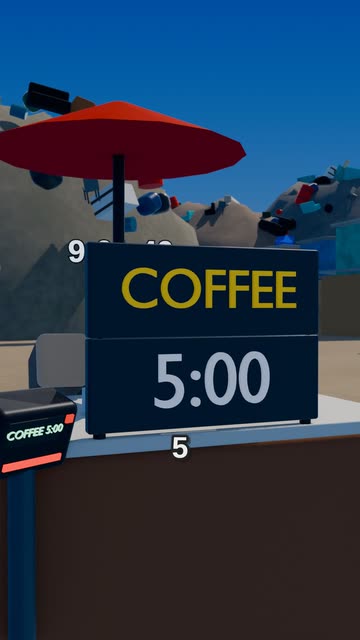 Block Town
What a Block Town video is
Every Block Town video starts with a rule: in this town, everyone pays with time; your name glows on your chest; a giant wheel picks your job each morning. The story follows one family living with that rule, and it ends on a turn nobody saw coming.
It is told fast, the way the viral ones are: a quick narrator, a new shot every couple of seconds, one-word captions in the middle of the screen, and sound effects on what you see. Blocky 3D people act it out in a whole town made for your story: the streets, the shops and the things the story needs.
If you have seen the “In this town” stories made with Roblox-style characters, this is that format. Nothing is made in Roblox or Roblox Studio: every person, street and building is built in code by StoryToonAI, so there is no game to open, no avatars to pose and no animation to keyframe. StoryToonAI is not affiliated with or endorsed by Roblox Corporation.
- Vertical 9:16 Shorts, from 15 seconds up to 3 minutes (45 seconds unless you pick another length)
- A brand-new story every time, from one line of yours
- Narration, music, sound effects and one-word captions included
- Download the MP4, or post it on a monthly plan
How to make one
- 1
Pick Block Town
Open New video and choose the Block Town style. It makes Shorts.
- 2
Give it a rule
Type a rule (“In this town, your shadow does your chores”) and it becomes the premise: the story keeps your rule, your people and any lines you wrote. You can also paste your own script.
- 3
Choose how hands-on to be
Switch on Auto-approve under Options for full automation, or leave it off to read the script and the storyboard before anything is made.
- 4
Watch it, then post it
The finished video waits for you at Publish. Download it, or post it to YouTube, TikTok, Instagram, Facebook and X on a monthly plan.
Full automation
From one idea to a finished video. Automatically.
Pick a style, type your idea and switch on Auto-approve. StoryToonAI writes the script, plans the storyboard, draws and animates every scene, and adds the voice, music and captions, with no approval steps in between. Or check each step yourself.
Full automation
- One switch, then one send
- Script and storyboard written and approved for you
- Every scene drawn and animated
- Voice, music and captions added
- Title, description and hashtags written
- Stops when the video is ready, so you watch it first
Step by step
- Read and edit the script, or ask for changes in plain words
- Deny a script and get a fresh take; every version is kept
- Check the storyboard and the characters
- See the price before you press Generate
- Switch on “Auto-approve the rest” at any step
Posting is a separate step: Auto-approve never posts. On a monthly plan, post each finished video to YouTube, TikTok, Instagram, Facebook and X right away or on a schedule. On pay as you go, download the MP4 and post it yourself.
Each step uses credits as it runs. If your balance runs out, Auto-approve pauses and says how many the next step needs; add credits and press Resume.
Block Town videos we made
In this world, everyone pays with time
Make one like this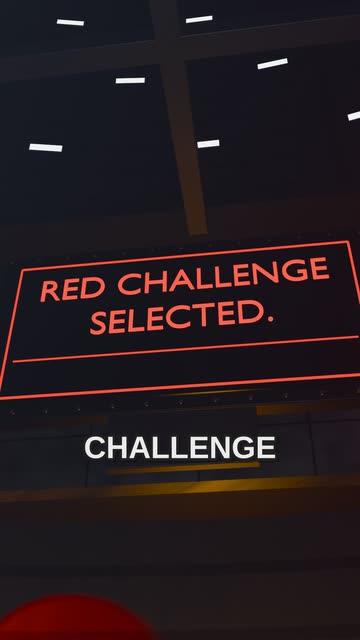
In this world, everyone votes on their challenge
Make one like this
Made by our team in these styles for our own channel, with our own ideas and a few fixes by hand. Full Auto-approve runs, with their prompts and credit totals, will be added here as we make them.
What a Block Town video costs
Block Town costs about 9.6 credits a second of finished video, so a 45-second Short is about 430 credits. That covers the story, the storyboard, the voice, the animation and the render.
The video step has a fixed price worked out from your script, shown before you press Generate, and that is exactly what it charges. Steps that fail are never charged.
Monthly plans add credits every month and auto-posting to all 5 platforms.
| Style | Credits a second | A 45-second Short |
|---|---|---|
| Block Town | about 9.6 | about 430 |
Typical figures for each style: your own video shows its exact price before you press Generate. $1 buys 100 credits, from $5, and bought credits never expire. See plans and credit packs
FAQ
Questions, answered
How do I make an “In this town” video with AI?
Open New video, pick the Block Town style and type a rule such as “In this town, every lie turns you a little bit blue”. Switch on Auto-approve for a hands-free run, or review the script and storyboard yourself. StoryToonAI writes the story, builds the town, animates the blocky 3D characters and adds the narrator, music and captions.
Do I need Roblox or Roblox Studio?
No. Block Town videos are made entirely by StoryToonAI: the characters, the town and the animation are built in code, so there is nothing to install and nothing to animate by hand. StoryToonAI is not affiliated with or endorsed by Roblox Corporation.
Is it fully automated?
Yes, if you want it to be. With Auto-approve on, one send makes the whole video, from the script to the finished video and its post text, with no approvals in between. It stops when the video is ready so you can watch it first, and it never posts by itself.
Can I use my own story?
Yes. Type your own rule or idea and it becomes the premise, or choose “Use my own script” and paste the words you want narrated.
How long can a Block Town video be?
From 15 seconds to 3 minutes, in vertical 9:16. The default is 45 seconds.
Can I post it to YouTube Shorts and TikTok?
On a monthly plan, connect your accounts once and post each finished video to YouTube, TikTok, Instagram, Facebook and X, right away or on a schedule. On pay as you go, download the MP4 and post it yourself.
Who owns the video?
You do. You can post the finished video anywhere.